Meet Mitek
We use Mitek to help us check it's really you and protect you from fraud.
Mitek checks that your ID is genuine and compares it with photos of your face. They use an encrypted connection to keep your information safe.
This means you can confirm your identity digitally, without sending your ID to us in the post.

When we'll ask you to use Mitek
We'll ask when you:
- apply for certain accounts
- register for mobile banking for the first time
- register the app on a new device
This helps us check it's really you and protect you from fraud.
How it works
We'll guide you through each step. Here's what to expect:
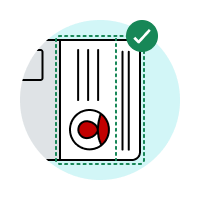
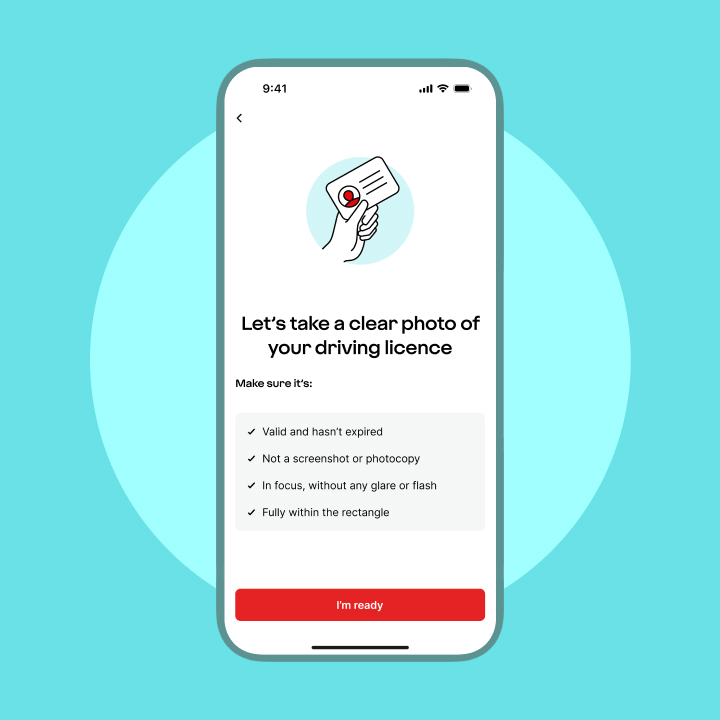
1. Take a photo of your ID
Follow the instructions to take a clear photo. Make sure it’s in focus and there’s no glare.

2. Take photos of your face
Find a spot with enough light and follow the instructions in the app to take your selfies.
3. We check it’s really you
Mitek compares the photo on your ID with the photos of your face, then sends us the result.
What you'll need
Make sure you have:
- a smartphone or tablet with a camera
- an internet connection
- a well-lit place to take clear photos
- your original photo ID, not a copy or screenshot
Photo ID you can use:
- a valid full or provisional driving licence
- a valid passport
- a national identity card
- your photo ID must be in date and undamaged. If you don’t have photo ID we accept, you can confirm your ID by post.
Proof of address
We may also ask for a document showing your current address. We'll let you know if you'll need this.
This should be a letter you've received from a trusted source, and it must clearly show your current address. For example:
- Bill (utility or council tax bill)
- Utility bills must be from the last 3 months. Your latest council tax bill or annual bill can be from the last 12 months.
- Bank statement
- From the last 3 months showing transactions. We can't accept statements from other Virgin Money accounts.
- Mortgage statement
- From the last 12 months.
- Benefits or state pension letter
- From the last 3 months and for benefits currently being paid.
- Insurance certificate
- Must be for a current insurance policy, and not for temporary cover.
Check out our how-to guides
How Mitek use your photos and personal information
The photos used for this identity check are separate from the face or fingerprint recognition used by your device.
Virgin Money and Mitek don’t receive or store the face or fingerprint information stored on your device.

Mitek uses your:
- photo ID
- photos of your face
- name
- date of birth
Mitek checks whether your photo ID is genuine and compares it with photos of your face. Mitek then sends us the result of the check.
Virgin Money keeps a record that the check took place and the result.
How long Mitek keeps your photos depends on why you’re confirming your identity.
If you’re opening an account
Mitek keeps photos of your ID and face for up to 7 days, then deletes them.
If you’re registering the app
Mitek keeps the image of your photo ID for up to 7 days, then deletes it.
Mitek stores the photo of your face for up to 3 years. They may use this photo if you register another device or need to confirm your identity again.
To continue with the identity check, you must agree to Mitek:
- using photos of your face to confirm your identity
- storing a face photo for future identity checks
Mitek may use the stored photo when you register another device or need to confirm your identity again.
Withdrawing your consent
You can withdraw your consent after you’ve registered.
This won’t stop you using digital banking. If you register another device later, you’ll need to use an activation code sent by post.
To withdraw your consent, call us or visit a branch.link takes you to branch finder page
0800 678 3654
Monday to Friday, 8am to 6pm
Saturday, 9am to 1pm
Calls may be recorded for training and quality purposes.
03 numbers
Same as calls to 01 or 02 numbers and they are included in inclusive minutes and discount schemes in the same way.
084 numbers
Maximum of 7p per minute, plus your phone company's access charge.
087 numbers
Maximum of 13p per minute, plus your phone company's access charge.
0800 numbers
Free from UK landlines and personal mobile phones.
Calls may be recorded for training and quality purposes
Confirm your ID another way
You can use an activation code sent to you by post instead.
Choose this option if you:
- don’t have photo ID we accept
- can’t complete the identity check
- would rather not use Mitek
How to get an activation letter
We’ll send a letter with your activation code to the postal address we hold for you. It should arrive within 5 working days.

You can call us during your application to ask for an activation code in the post.
When it arrives, follow the instructions in the letter to continue your application.
Choose the activation code option in the app when you register.
When your letter arrives in the post, return to the app and enter the code to finish registering.
Get help with the identity check
Find help if your photo ID, face photos, one-time passcode, camera or app are not working.

Someone you trust can help you position your phone and follow the instructions.
For your security, they must not:
- complete the identity check for you
- appear in the photos
- see your password, PIN or any one-time passcodes
If you still can’t complete the check, there may be another way to confirm your identity. What you can do depends on whether you’re opening an account or registering the app.
If you’re opening an account, contact us during your application and we’ll send you an activation code in the post.
If you’re registering the app, choose the option to be sent an activation code by post.
Check that:
- it’s one of the identity documents we accept
- you’re using the original document
- it’s in date and undamaged
- all 4 corners of the document are visible
- the details and photo are clear
- there’s no glare or shadow
- nothing covers the document
If it’s still not accepted, you can use an activation code sent by post instead.
You’ll need to use another identity document that’s in date.
If you don’t have one, you can use an activation code sent by post instead
You can use another accepted identity document or an activation code sent by post.
Try again and:
- clean the camera lens
- move somewhere well lit
- make sure your whole face is visible
- hold the device level with your face
- follow the instructions shown in the app
If the check still does not work, you can use an activation code sent by post instead.
Check that:
- the mobile number shown is correct
- your device has a mobile signal
Wait a few minutes, then request another code.
Contact us before trying to register again.
We may need to update your details or carry out extra security checks.
You can close the app and come back later.
When you return, the app will use your previous choice to take you to the right part of the registration journey.
Check that:
- the Virgin Money app has permission to use the camera
- your internet connection is working
- the app and your device software are up to date
- no other app is using the camera
Close and reopen the app, then try again.
If you have started the letter journey but have not finished registering, you can return to the app and use the identity check instead.
If you have already registered using a code sent by post and want to use the identity check later, you’ll need to delete the app and register again.
Need to talk to us?
Give us a call on
0800 678 3654
Or if you're abroad, call us on +44 141 221 7300
Opening times
We're here Monday to Friday 8am to 6pm and Saturday 9am to 1pm.
Calls may be recorded for training and quality purposes.
Call charges and information03 numbers
Same as calls to 01 or 02 numbers and they are included in inclusive minutes and discount schemes in the same way.
084 numbers
Maximum of 7p per minute, plus your phone company's access charge.
087 numbers
Maximum of 13p per minute, plus your phone company's access charge.
0800 numbers
Free from UK landlines and personal mobile phones.
Calls may be recorded for training and quality purposes.
Stay safe from fraud
Never share your one-time passcodes, app password or PIN.
We’ll never ask you to:
- move money to a “safe account”
- let someone else complete your identity check
- give someone remote access to your device
If you receive a registration request you didn’t make, stop and don’t continue.
Report suspected fraudWas this information helpful?
Thanks for your feedback!
Just so you know, we can't reply to feedback directly. If you need any extra help, please contact us.